
Face Slimming with Nano Banana: The Ultimate Guide to Natural Photo Retouching
Face Slimming with Nano Banana: The Ultimate Guide to Natural Photo Retouching
Transform your portraits with AI-powered face slimming that keeps you looking authentically beautiful
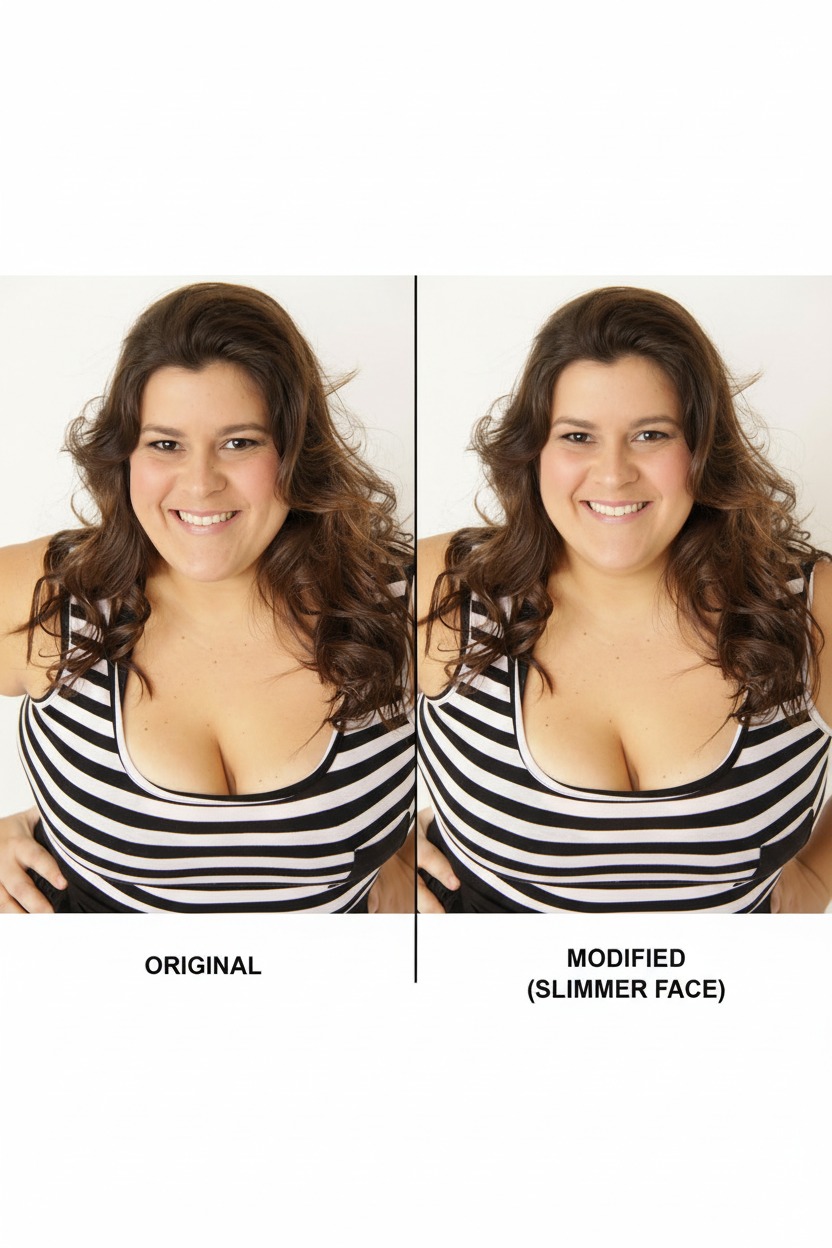
Have you ever taken a photo where your face looked a bit rounder than you'd like? Maybe the camera angle wasn't flattering, or perhaps you were having one of those days where everything seemed puffy. With Nano Banana (Gemini 2.5 Flash Image Preview), you can now achieve natural, professional-quality face slimming in seconds—no expensive software or complex tutorials required.
Why Face Slimming Matters for Content Creators
In today's visual-first world, your photos need to make an impact. Whether you're:
- Building your personal brand on Instagram or LinkedIn
- Creating content for TikTok or YouTube
- Preparing professional headshots
- Enhancing dating app photos
- Building an online business presence
The right photo editing can make the difference between a scroll-past and a double-tap.
The Nano Banana Advantage
Unlike traditional photo editing tools that require complex masking and professional skills, Nano Banana uses advanced AI to understand facial structure and make natural-looking adjustments. Here's why it's revolutionary:
✨ Natural Results
The AI preserves your unique features while making subtle improvements—no "plastic" look
⚡ Lightning Fast
What used to take 30+ minutes in Photoshop now takes 30 seconds
🎯 Precise Control
Slim just the face while keeping everything else exactly the same
💡 No Learning Curve
Simple text prompts instead of complex tool interfaces
Step-by-Step Tutorial: Perfect Face Slimming
What You'll Need
- A clear photo of yourself (front-facing works best)
- Access to nanobanana.best or AI Studio
- 2 minutes of your time
The Process
Step 1: Choose Your Photo
Select a high-quality image where:
- Your face is clearly visible
- Good lighting (natural light is ideal)
- Minimal shadows across your face
- You're facing roughly toward the camera
Step 2: Access Nano Banana
Option A: Quick & Easy
- Go to nanobanana.best
- The popular face-slimming mode is built-in
- One-click application
Option B: Full Control
- Visit AI Studio
- Switch to "Gemini 2.5 Flash Image Preview" model
- Upload your image
Step 3: Apply the Perfect Prompt
For natural, professional results, use this exact prompt:
Make the subject's face slightly slimmer while preserving identity.
Clean minor skin blemishes. Light natural retouch only.
Keep pores and authentic skin texture. No plastic smoothing.
Step 4: Fine-Tune If Needed
If the first result is too subtle:
Make the face slimming more noticeable but still natural-looking.
Maintain facial proportions and authentic features.
If it's too dramatic:
Very subtle face slimming only. Barely noticeable change.
Focus on refining the jawline while keeping natural appearance.
Advanced Techniques for Power Users
Multi-Angle Enhancement
For profile or 3/4 angle photos:
Refine the facial contours from this angle. Subtle slimming
of visible cheek area while maintaining natural bone structure.
Combined Enhancement
Get the full glow-up in one go:
Light facial slimming + enhance skin tone + improve lighting.
Professional headshot quality while keeping authentic look.
Batch Processing Strategy
Working with multiple photos? Use this workflow:
- Process your best photo first to establish the look
- Use consistent prompts across the series
- Start new sessions every 4-5 edits to prevent AI drift
The Secret Sauce: Professional Prompting Tips
✅ Do This
- Use "subtle," "natural," "light" in your prompts
- Specify "preserve identity" or "maintain authentic features"
- Ask for "professional" or "polished" results
- Include "no plastic smoothing" or "keep skin texture"
❌ Avoid This
- Words like "dramatic," "major," or "significant"
- Multiple conflicting requests in one prompt
- Overly technical terminology
- Requests that alter bone structure
Common Mistakes and Quick Fixes
Problem: Face looks "plastic" or over-smoothed
Solution: Add "preserve natural skin texture" to your prompt
Problem: Features look distorted
Solution: Restart the session and use gentler language like "very subtle"
Problem: Identity drift (you don't look like yourself)
Solution: Always include "preserve identity" or "maintain facial features"
Problem: Inconsistent results
Solution: Be specific about what to keep vs. what to change
Beyond Basic Slimming: Professional Variations
The LinkedIn Professional
Professional headshot enhancement: subtle face slimming,
clean complexion, confident expression. Corporate-appropriate
natural retouching.
The Instagram Influencer
Social media ready: gentle face slimming, glowing skin,
maintain authentic beauty. Perfect for lifestyle content.
The Dating App Winner
Attractive but authentic: natural face refinement,
clear complexion, warm approachable look. Genuine and appealing.
Integration with Your Content Strategy
For Content Creators
- Process key photos before major posts
- Maintain consistent editing style across your feed
- Save successful prompts for future use
For Professionals
- Create a signature look for all business photos
- Process headshots for different platforms consistently
- Keep a "brand file" of your best prompting formulas
For Personal Use
- Enhance special occasion photos
- Improve casual social media content
- Build confidence with better daily selfies
Quality Guidelines: Staying Ethical and Authentic
The Golden Rules
- Enhance, don't replace - You should still look like you
- Subtle is better - Small improvements compound to big results
- Consistency matters - Don't switch between dramatically different looks
- Be honest - If using for professional purposes, ensure accuracy
When to Stop Editing
- If friends wouldn't recognize you
- If the changes feel uncomfortable
- If you're trying to look like someone else
- If the editing becomes compulsive
Troubleshooting Common Issues
Low-Quality Source Photos
Problem: Blurry or pixelated input images Solution: Try this prompt first:
Enhance image quality: sharpen details, improve resolution,
reduce noise. Then apply subtle face slimming.
Strong Shadows or Poor Lighting
Problem: Harsh shadows affecting face shape Solution:
Improve lighting balance, reduce harsh shadows, then apply
gentle face slimming. Natural daylight appearance.
Group Photos
Problem: Want to slim only your face in a group shot Solution:
Focus enhancement on [describe your position: "person on the left,"
"woman in center," etc.]. Light face slimming for that subject only.
The Technical Side: How It Actually Works
Nano Banana uses advanced computer vision to:
- Map facial landmarks with precise accuracy
- Understand 3D face structure from 2D images
- Apply selective adjustments while preserving realism
- Maintain lighting consistency across the edited areas
- Preserve fine details like skin texture and hair
This is why the results look natural compared to traditional tools that simply squeeze or stretch pixels.
Building Your Personal Editing System
Create Your Prompt Library
Save these templates in your notes:
Everyday Enhancement:
Light face slimming + natural glow. Authentic beauty enhancement.
Professional Polish:
Professional headshot quality: subtle face refinement,
clean complexion, confident appearance.
Social Media Ready:
Instagram-worthy but authentic: gentle slimming,
glowing skin, natural radiance.
Track What Works
Keep a simple log:
- Photo type → Best prompt → Result quality (1-10)
- Note which prompts give consistent results
- Track engagement on social media
Weekly Editing Routine
- Collect your best photos from the week
- Batch process using proven prompts
- Review and select winners
- Schedule posts with consistent quality
Future-Proofing Your Skills
What's Coming Next
- Higher resolution outputs for print quality
- Video face slimming for content creators
- Style consistency across photo sets
- Real-time processing integration
Staying Ahead
- Experiment with new prompt combinations monthly
- Follow AI editing communities for tips
- Test different photo styles and angles
- Build a portfolio of successful edits
Real Creator Success Stories
Sarah, Fashion Blogger (@stylewithoutstress)
"I was spending 2+ hours editing each post. Now I get better results in 2 minutes. My engagement is up 40% since I started using consistent, natural face slimming."
Marcus, Corporate Consultant
"Professional headshots used to cost $500+ and take weeks. Now I can create LinkedIn-quality photos instantly for client meetings and proposals."
Jenny, College Student
"Perfect for dating apps and social media. I look like myself but with that 'good lighting' effect every time. My friends keep asking what my secret is!"
Getting Started Today: Your Action Plan
5-Minute Quick Start
- Right now: Pick your best recent selfie
- Go to: nanobanana.best
- Apply: The basic face slimming prompt
- Compare: Before and after
- Share: Post a before/after story (optional)
This Week
- Process 5 different photos to understand what works
- Save your 3 favorite prompts
- Test different lighting conditions
- Share your best result
This Month
- Build a consistent editing style
- Create prompt templates for different uses
- Track which edits get better engagement
- Help friends discover the tool
Conclusion: Your New Editing Superpower
Face slimming with Nano Banana isn't just about looking better in photos—it's about feeling confident in your digital presence. In a world where your image matters, having professional-quality editing at your fingertips is a genuine advantage.
The key is subtlety. The best face slimming makes people say "You look great!" not "You look different." With the prompts and techniques in this guide, you can achieve that perfect balance of enhancement and authenticity.
Remember: you're already beautiful. Nano Banana just helps your photos capture that beauty more consistently.
Quick Reference Card
Best General Prompt
Make the subject's face slightly slimmer while preserving identity.
Light natural retouch only. Keep authentic skin texture.
Emergency Fixes
- Too dramatic: Add "very subtle" and "barely noticeable"
- Too smooth: Add "preserve skin texture" and "natural pores"
- Wrong identity: Restart session, add "maintain facial features"
Access Points
- One-click: nanobanana.best
- Full control: AI Studio → Gemini 2.5 Flash Image Preview
Ready to transform your photos? Start with one image today and see the difference natural AI enhancement can make.